


Samsung Food: Meal Planner
4.54.09K Reviews
App Specs
- Version
- 2.55.0
- Updated On
- License
- Free
- Downloads
- 1,000,000+
- Developer
- SamsungFood
- Categories
- Food & Drink
- Platform
- Android, iOS
Screenshots


 Analysis by AppCompare
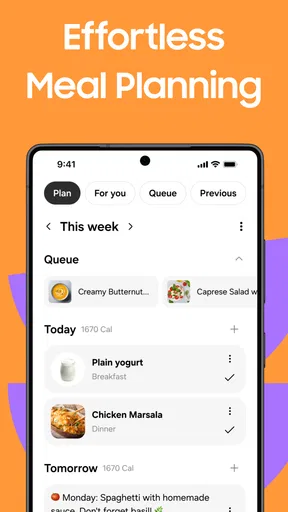
Meal planning sounds simple until a busy day knocks dinner off course. I like having one place to collect recipes, decide what to cook, and turn those choices into a shopping plan, and Samsung Food: Meal Planner is built around that kind of routine. It is a free food and drink app from SamsungFood, with optional in-app purchases, and it brings several steps of home cooking together rather than focusing on recipes alone.
Where planning can get stuck
The most useful part of a meal planner is not the calendar itself; it is reducing the small decisions that pile up before dinner. A recipe may look appealing, but if I cannot remember what I need to buy, or I have no plan for using the ingredients, it is easy to fall back on a familiar takeaway. This app’s combination of recipes, planned meals, shopping lists, and nutrition tools is meant to connect those decisions.
That connection still depends on a little input. A week of meals will only be helpful if the choices suit your schedule, cooking confidence, and appetite. I would start with a few dinners rather than trying to map every meal at once. That makes it easier to see whether the suggestions and planning routine fit your household before you invest time in filling out a detailed week.
Recipe discovery can also be a mixed experience: plenty of choice is useful, but browsing can become another task if you open the app without a particular need in mind. I get more from it when I search with a practical question—what can I cook on a busy evening, or what should I make with the things I plan to buy—than when I scroll aimlessly. That small change keeps planning focused on meals I might actually prepare.
Getting Started with Samsung Food
First things first, downloading the app was a breeze. Whether you're on Android or iOS, it’s readily available and free to download. Once installed, the setup was straightforward. The app greeted me with a simple and clean interface, which was super inviting. I love it when I don’t have to spend hours figuring out how an app works.
Upon launching, it prompts you to enter some basic info about your dietary preferences and restrictions. Whether you’re vegan, gluten-free, or just a picky eater, the app caters to everyone. I personally appreciated this feature because it means the recipes it suggests are always tailored to my needs.
Features that Stand Out
Now, let’s dive into the meat of the app – its features. The Samsung Food: Meal Planner app is loaded with tools that make meal planning as easy as pie.
Worth Reading Before You Choose

Switching to Android Auto Means Rethinking Your Driving Routine

Google Calendar Makes a Crowded Week Easier to Manage

Baby Panda World Brings Quick Play to Modern Phones, but Its Game Library Feels Busy

ESPN’s Live Game View Makes Following Close Games Easier

QuizzLand Review: A Good Fit for Short Trivia Breaks, Not Every Player

Basketball Stars: Multiplayer Is Fast, but Can It Recover When Matches Go Wrong?
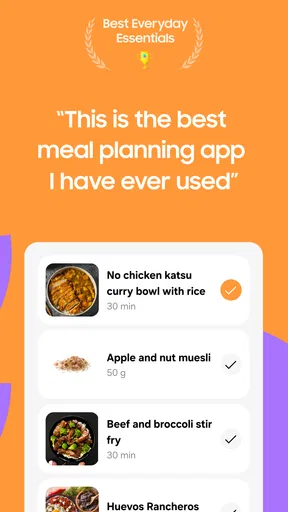
Recipe Suggestions: The app boasts a vast library of recipes. It’s like having a personal chef in your pocket. Whether you're in the mood for a quick snack or a gourmet meal, the app has something for you. What’s cool is that it learns from your choices and suggests recipes that you’re likely to enjoy.
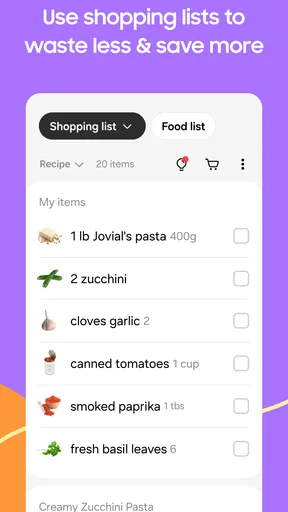
Shopping List: This feature is a lifesaver. Once you select your meals for the week, the app generates a shopping list for you. It’s organized by aisle, so you’re not running back and forth in the grocery store. You can check off items as you go, which is super satisfying.
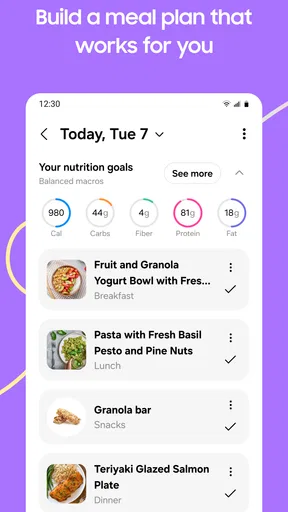
Meal Planning: With just a few taps, you can plan your meals for the entire week. The drag-and-drop interface makes it easy to shuffle meals around if your plans change. I found this particularly helpful for avoiding last-minute takeout orders.
Make the plan work in real life
A useful trick is to build a plan around the nights you know will be difficult, not around an ideal week. I would choose the quickest or most familiar recipes for those evenings and leave more ambitious cooking for a day when I have room to enjoy it. Then, if plans change, moving a meal gives the week some flexibility without requiring me to start over.
The shopping list is most valuable after I have reviewed it, not as a list I follow blindly. Before a grocery trip, I would check what is already in the kitchen and remove anything I do not need. That quick pass can prevent buying duplicates and helps the list reflect the way I actually shop. If a store groups products differently from the list, I can still use the checked items as a simple reminder rather than treating its organization as a perfect map of every shop.
For a realistic routine, imagine getting home late on a weekday with little energy to decide what to cook. If I have already selected a meal and gathered its ingredients on the previous shop, the decision is mostly made. On another day, I can shift that recipe and use the shopping list to prepare for the next trip. The benefit is less about a flawless schedule and more about having a workable fallback.
Cooking Made Easy
If you’re not a seasoned chef, don’t worry. The app provides step-by-step instructions for each recipe, complete with photos. It’s like having a cooking class right on your phone. Plus, there are timers built into the app, so you won’t burn your dinner while you’re multitasking.
For those who love to experiment, the app lets you modify recipes and save your own creations. I tried tweaking a few dishes by adding extra spices, and the app saved my versions seamlessly.
Small choices that improve the cooking workflow
I find recipe instructions easier to follow when I read through them before I start, rather than discovering every step while ingredients are already on the counter. That is especially helpful when a dish has several stages or when I am cooking around other tasks. I can check the ingredient list against what I have, then decide whether the recipe is realistic for that evening.
Saving a modified recipe is useful when a change is one I want to repeat, but I would keep the original in mind as a reference. A small seasoning adjustment is different from changing the main ingredients or method, which can affect timing and texture. Treating a saved version as my own variation—not as a guarantee that every substitution will behave the same way—keeps expectations sensible.
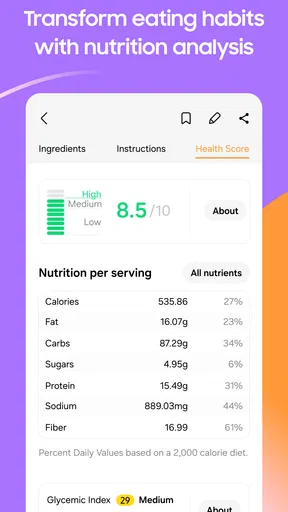
Nutrition tools can add context when I am comparing meal ideas, but they are not a substitute for careful dietary planning. If I have a medical restriction or need to avoid an ingredient for safety, I would check the recipe details and labels myself instead of relying only on a general preference setting. That extra check matters because a recommendation is a starting point, not a personal nutrition consultation.
Integration with Samsung Devices
Now, here’s where the app gets even cooler if you're a Samsung user. It integrates with Samsung’s ecosystem, meaning you can sync the app with your Samsung fridge. Imagine having your shopping list displayed right on your fridge’s screen – talk about futuristic!
If you have a Samsung smartwatch, you can also view recipes and shopping lists right from your wrist. It’s these little conveniences that make life a bit easier.
Setup checks and everyday friction
The app is available on Android and iOS, and its current version is 2.52.1. It requires Android 7.0 or later on Android devices. Before troubleshooting, I would check that the device meets that requirement and that the app is up to date. If a screen behaves unexpectedly, closing and reopening the app and checking the connection are sensible first steps; they are general checks, not a promise that every issue has the same cause.
If you are setting it up for a household, decide whose preferences should guide recipe discovery and who will maintain the shopping list. A plan can become confusing when several people make changes without a shared routine. Even without making the app responsible for every household decision, agreeing on who adds meals and who checks the list can make the workflow much more reliable.
Some conveniences are most relevant to people who already use compatible Samsung devices. If you do not own a Samsung fridge or smartwatch, the app can still be useful as a standalone meal-planning tool; those integrations are an extra, not the reason everyone should install it. Conversely, if device-specific handoffs are your main reason for choosing it, check that your own devices support the workflow you want before building a routine around it.
Community and Sharing
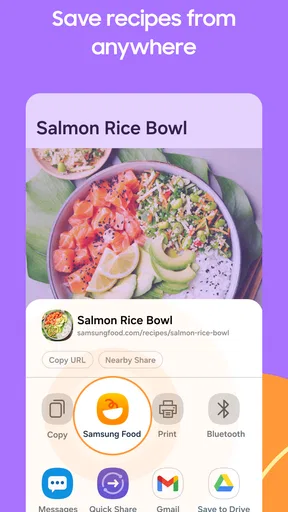
Another feature I found intriguing is the community aspect. You can share your favorite recipes with friends and family directly through the app. It’s a great way to connect with fellow foodies and discover new dishes to try.
There’s also a rating and review system for recipes, so you can see what others think before diving into something new. I personally enjoy reading reviews to get tips on how to tweak recipes to perfection.
Recovering when a plan goes off track
A missed meal does not need to wreck the rest of the week. I would move it to another day if it still suits the ingredients I have, or remove it and adjust the shopping plan before the next trip. The key is to treat the calendar as a draft rather than a promise. That mindset makes a planner more forgiving when work, family plans, or simple changes in appetite intervene.
If a recipe, list, or device connection seems out of sync, first identify which part of the workflow is affected. Check whether the meal itself is still on the plan, whether the list reflects the meals you intend to cook, and whether the issue happens on the phone or only on another device. Narrowing it down is more useful than repeatedly editing everything, which can create extra confusion.
For a list that looks wrong, I would review the selected meals and the items I have already checked before making broad changes. For a recipe that does not suit the evening, I would swap the meal rather than force myself to cook it. These small recovery steps help preserve the planning benefit without turning a flexible tool into another source of pressure.
When another option may suit you better
Compared with keeping recipes in browser bookmarks and writing groceries on paper, this app brings the planning and shopping stages closer together. That is handy if you regularly forget what a saved recipe needs or end up buying without a dinner plan. A notes app can still be quicker for someone who already has a simple list-making habit and does not want recipe discovery, planning, or nutrition tools in the same place.
Likewise, a dedicated recipe collection may be a better fit if your main goal is carefully organizing a personal cookbook, while a plain calendar may be enough if you already know what your household eats. I see Samsung Food as most appealing to people who want to discover meals and connect them to shopping, rather than people seeking the fewest possible taps or a highly specialized cooking system.
The app is rated for Teen audiences, and its average rating is 4.6 from around 22,000 ratings; it has more than a million installs. Those figures suggest it has found a broad audience, but they cannot tell me whether its recipe mix matches your tastes or whether you will enjoy planning ahead. The better test is whether you find yourself returning to it when deciding what to cook.
Final Thoughts
All in all, the Samsung Food: Meal Planner app is a fantastic tool for anyone looking to streamline their meal planning process. It’s user-friendly, packed with helpful features, and integrates beautifully with Samsung devices.
Whether you're a culinary novice or a seasoned home cook, this app has something to offer. It’s made my life a little less hectic and a lot more delicious. I highly recommend giving it a try. Happy cooking!
Who I would recommend it to
I would recommend it to someone who cooks at home often enough to benefit from choosing meals in advance, but still wants fresh ideas and a connected shopping list. It can be particularly handy for people balancing different preferences at home, provided they are willing to review recipes and make the final call on ingredients. The free starting point makes it approachable, while in-app purchases range from $6.99 to $59.99 per item, so I would check the options in the app and decide whether any paid offering is worthwhile for my own routine.
I would skip it if I prefer to make food decisions spontaneously, already have a system that works, or mainly want a bare-bones grocery checklist. Adding every meal and then feeling obliged to follow it would defeat the point. The app is best used as a practical aide, not a strict diet coach or a guarantee that a busy week will run perfectly.
SamsungFood released the app on December 16, 2019, and the current version is 2.52.1. What matters more in daily use is whether its combined approach saves me effort: I can explore recipes, decide what to cook, and carry those choices into shopping. If that is the part of home cooking that regularly trips you up, I think it is worth trying; if the planning itself feels like extra work, a simple notes list may serve you better.
Pros
- User-friendly interface for easy navigation.
- Extensive recipe database with diverse cuisines.
- Personalized meal plans based on dietary needs.
- Integration with grocery lists for convenience.
- Nutritional info provided for each recipe.
Cons
- Requires account for full feature access.
- Limited offline functionality.
- Occasional ads may interrupt usage.
- Some features locked behind premium.
- May require internet for real-time updates.
FAQs for Samsung Food: Meal Planner
What features does Samsung Food: Meal Planner offer?
Samsung Food: Meal Planner provides a comprehensive suite of features to streamline meal planning. Users can create personalized meal plans, access a vast library of recipes, and generate shopping lists. The app also offers nutritional tracking, allowing users to monitor their dietary intake and adjust meals according to dietary preferences or restrictions.
Is Samsung Food: Meal Planner suitable for people with dietary restrictions?
Yes, Samsung Food: Meal Planner is designed to accommodate various dietary needs. Users can filter recipes based on dietary restrictions like gluten-free, vegetarian, or keto. The app allows customization of meal plans to ensure that users adhere to their specific dietary guidelines, making it a versatile tool for anyone with special dietary needs.
Can I sync Samsung Food: Meal Planner across multiple devices?
Absolutely, Samsung Food: Meal Planner supports synchronization across multiple devices. Users can log in with their Samsung account to access their meal plans, recipes, and shopping lists seamlessly on both Android and iOS devices. This feature ensures that users can manage their meal planning on the go, whether from a smartphone or tablet.
How does Samsung Food: Meal Planner help with grocery shopping?
The app simplifies grocery shopping by generating detailed shopping lists based on your selected recipes and meal plans. Users can adjust quantities and check off items as they shop, making the process efficient. This feature helps ensure that you buy exactly what you need, reducing food waste and saving time during your grocery trips.
Is Samsung Food: Meal Planner user-friendly for beginners?
Yes, Samsung Food: Meal Planner is designed with user-friendliness in mind. The interface is intuitive, making it easy for beginners to navigate through meal planning, recipe selection, and nutritional tracking. The app provides step-by-step instructions and tips, ensuring that even those new to meal planning can use it effectively and confidently.


